Getting Started
Welcome to Age of Time — a small, multiplayer action/RPG built on the Torque Engine by Eric "Badspot" Hartman, released in 2005 and still playable today.
Download & install
The current public release is Version 30 (5/3/2024).
Download v0030 from ageoftime.com
- Grab the installer from the link above (or the official downloads page).
- Run the installer and let it extract the game files.
- Launch
AgeOfTime.exefrom the install folder.6
Older releases
Older builds shipped as .rar archives that required WinRAR or WinZIP to
extract. The current installer handles this for you.
Controls
These are the default bindings shipped with the game. The full list is
defined in base/client/config.cs and can be remapped from the in-game
options menu (Ctrl+O).
Movement
| Key | Action |
|---|---|
| W | Move forward |
| A | Strafe left |
| S | Move backward |
| D | Strafe right |
| Space | Jump |
| Left Shift | Walk (hold) |
| C | Crouch / swim down / disconnect from a hook |
| Ctrl+W | Auto-walk forward |
| ← / → | Turn left / turn right |
Combat & interaction
| Key | Action |
|---|---|
| Left Mouse | Attack |
| Right Mouse | Shield |
| E | Action (interact, talk, pick up, buy) |
| Ctrl+E | Stop action |
| Ctrl+K | Suicide |
Inventory & menus
| Key | Action |
|---|---|
| I | Open inventory |
| 1–9, 0 | Inventory quick slots 1–10 |
| O | Open status window |
| V | Open the Voice / Action menu |
Camera & view
| Key | Action |
|---|---|
| Mouse | Look (yaw / pitch) |
| Tab | Toggle 1st / 3rd person |
| Z | Toggle free look |
| F | Toggle zoom |
| R | Set zoom field-of-view |
| ↑ / ↓ | Pan camera up / down |
| Alt+C | Toggle detached camera |
| F7 | Drop player at camera (detached-camera mode) |
| F8 | Drop camera at player (detached-camera mode) |
Chat & HUD
| Key | Action |
|---|---|
| T | Toggle global chat |
| Y | Local-area chat |
| P | Resize the chat HUD |
| Page Up / Page Down | Scroll chat history |
| F2 | Show player list |
System
| Key | Action |
|---|---|
| Ctrl+O | Options menu |
| Ctrl+P | Take a screenshot |
| F3 | Start recording a demo |
| F4 | Stop recording a demo |
| Ctrl+A | Open admin window (server admins only) |
| Esc | Quit to the main menu |
Interacting with the world
Look at something and press E to interact. Press Ctrl+E to stop.
- Rescuing players — pick up a dead player. Drop them (Ctrl+E) on a bed to bring them back to life. The player can resist being rescued by pressing jump (default Space).
- Open doors — look at a door and press E.
- Buy things — the price appears above an item. Look at it and press E to purchase.
Maps
-
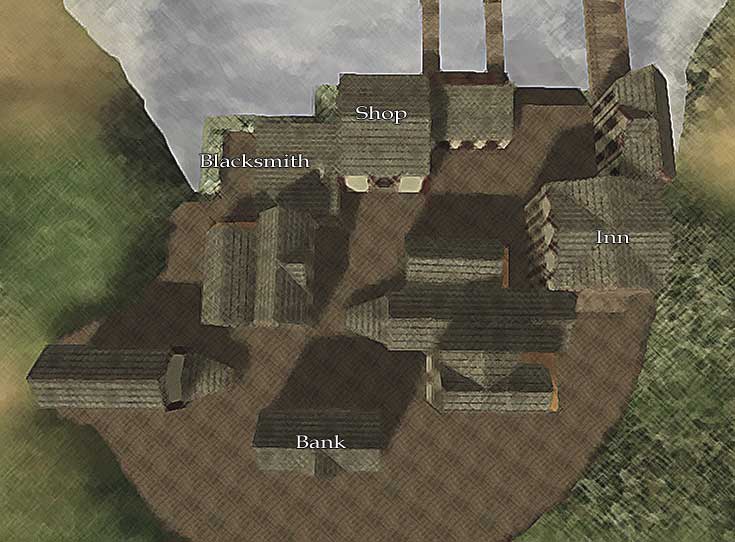
Port Town — the starting town and central hub.
-
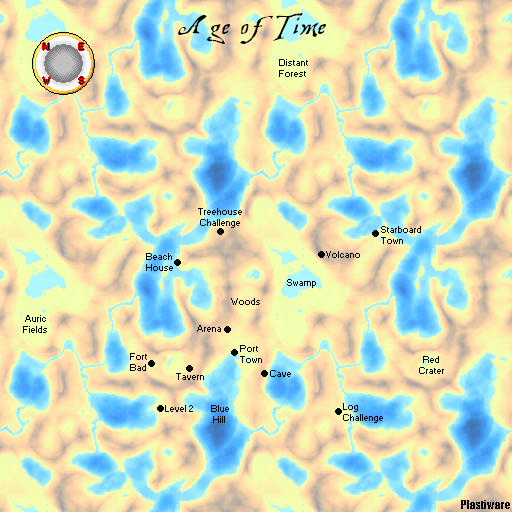
Overworld — the world surrounding Port Town.
A more detailed community-made map is available on the Areas page.
Note
This maps section is archaic and due for a fuller refresh.
Where to next?
- Browse Items for weapons, dyes, materials, and utility items.
- Check the Magic menu and Slash Commands.
- Tour the world on the Areas page.
- Read up on Enemies you'll run into.
- Pick up community lore in Tips & Secrets.